 cyberWriter
Live data blocks · charts that read your files and the web · a real terminal · your own AI
A Markdown studio
for Mac, iPad and iPhone.
Charts that pull live data from a file in your vault or a URL on the web, and redraw when it changes. API blocks that run and render in the document. A full terminal that knows your vault. Your own system prompts, on a local model or a cloud one. A 3D knowledge map you can search by concept. Write in true WYSIWYG or split view, style it with your own CSS, and export a PDF with your fonts, your background and no pagination at all. All native, all in one signed app. Nothing to install alongside it.
$14.99, once. No subscription. No account. No telemetry.
iOS 1.2 is live/buy direct/Setapp
The knowledge graph, orbiting the example vault
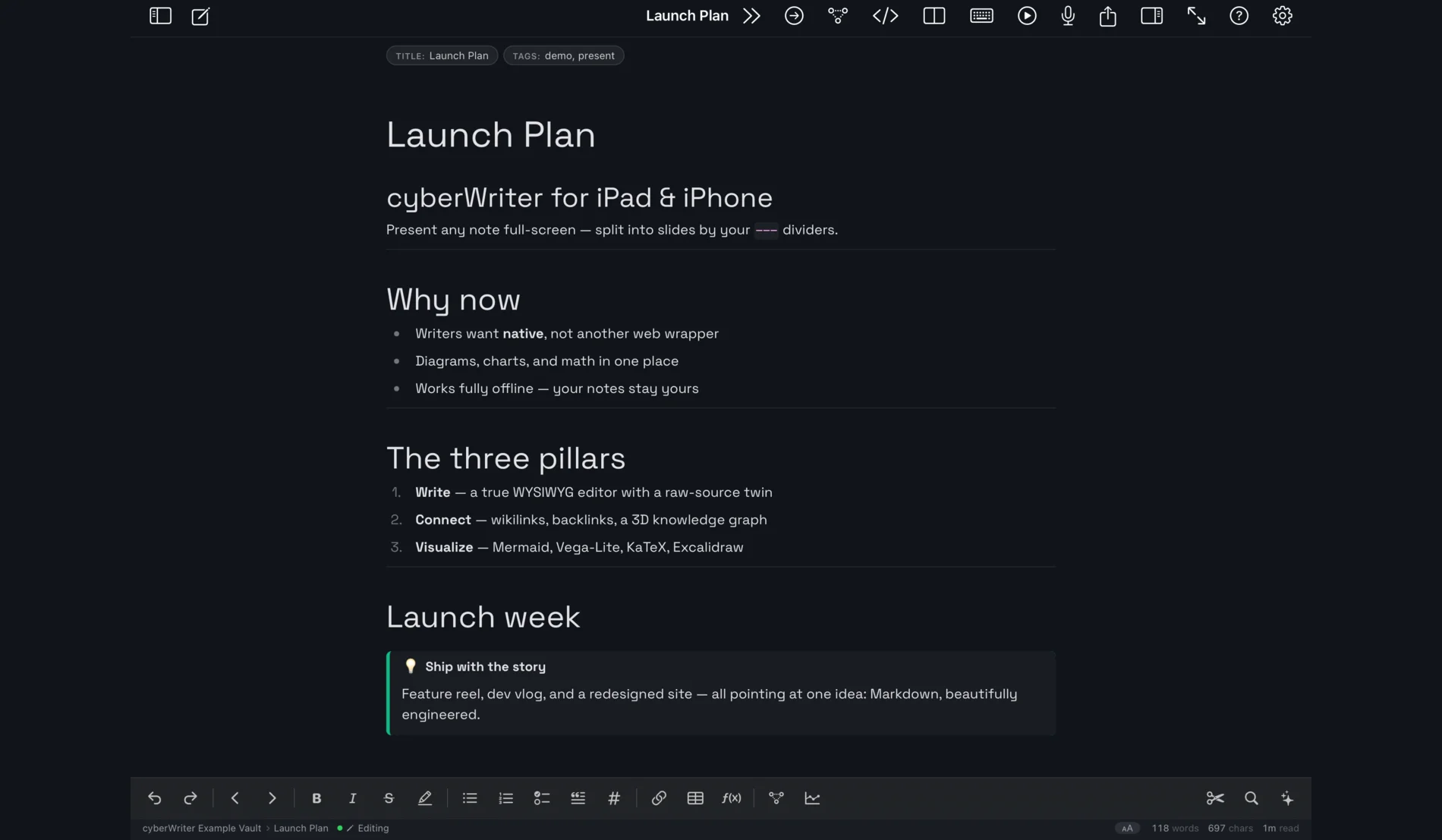
True WYSIWYG.
Real Markdown.
Write formatted text while the file on disk stays plain .md. One tap flips to raw source and back. Nothing is hidden from you, and nothing is locked in.
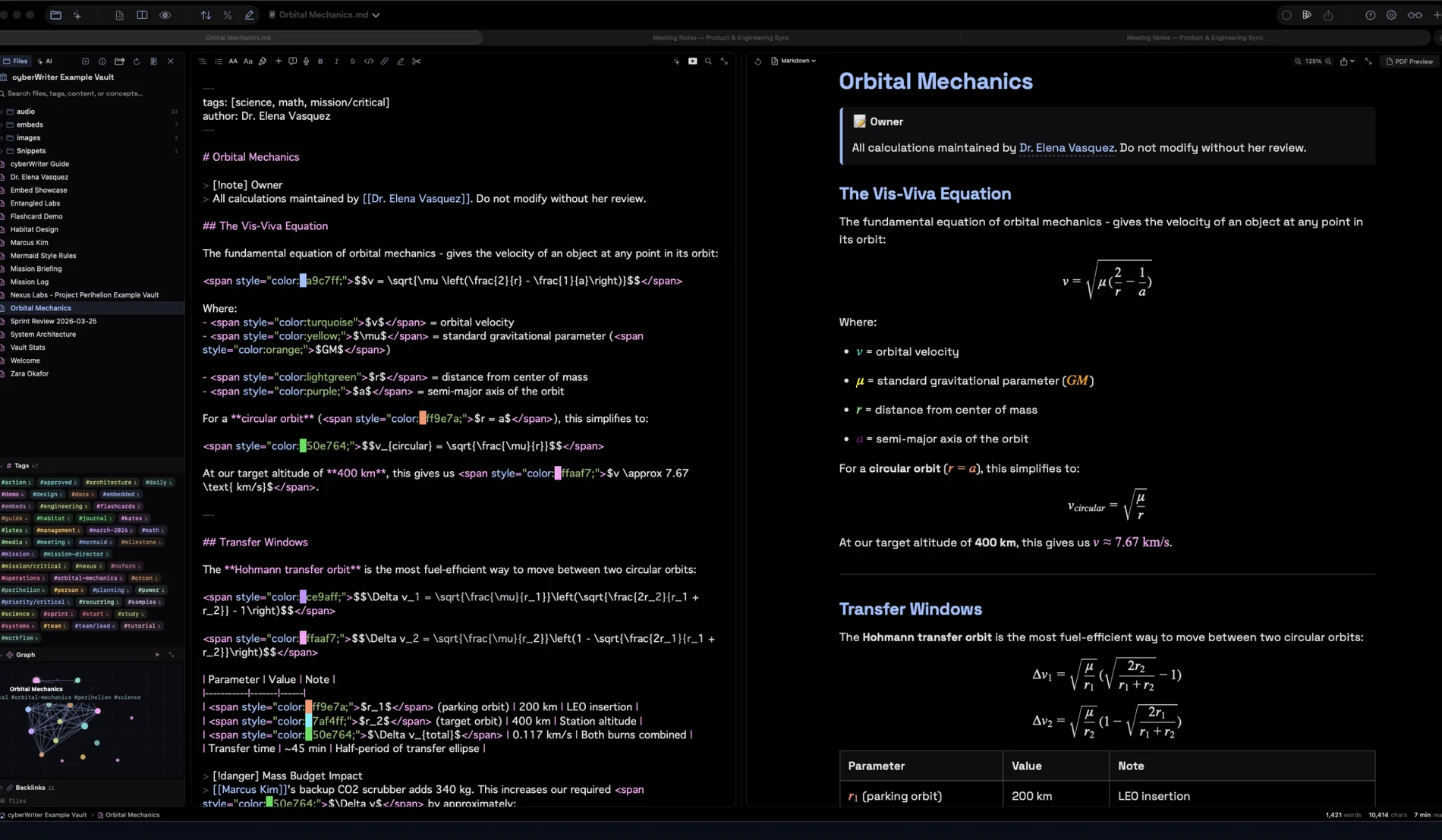
Source and result,
side by side.
Syntax coloured Markdown on the left, the living document on the right, scroll synced. See exactly what produces what.
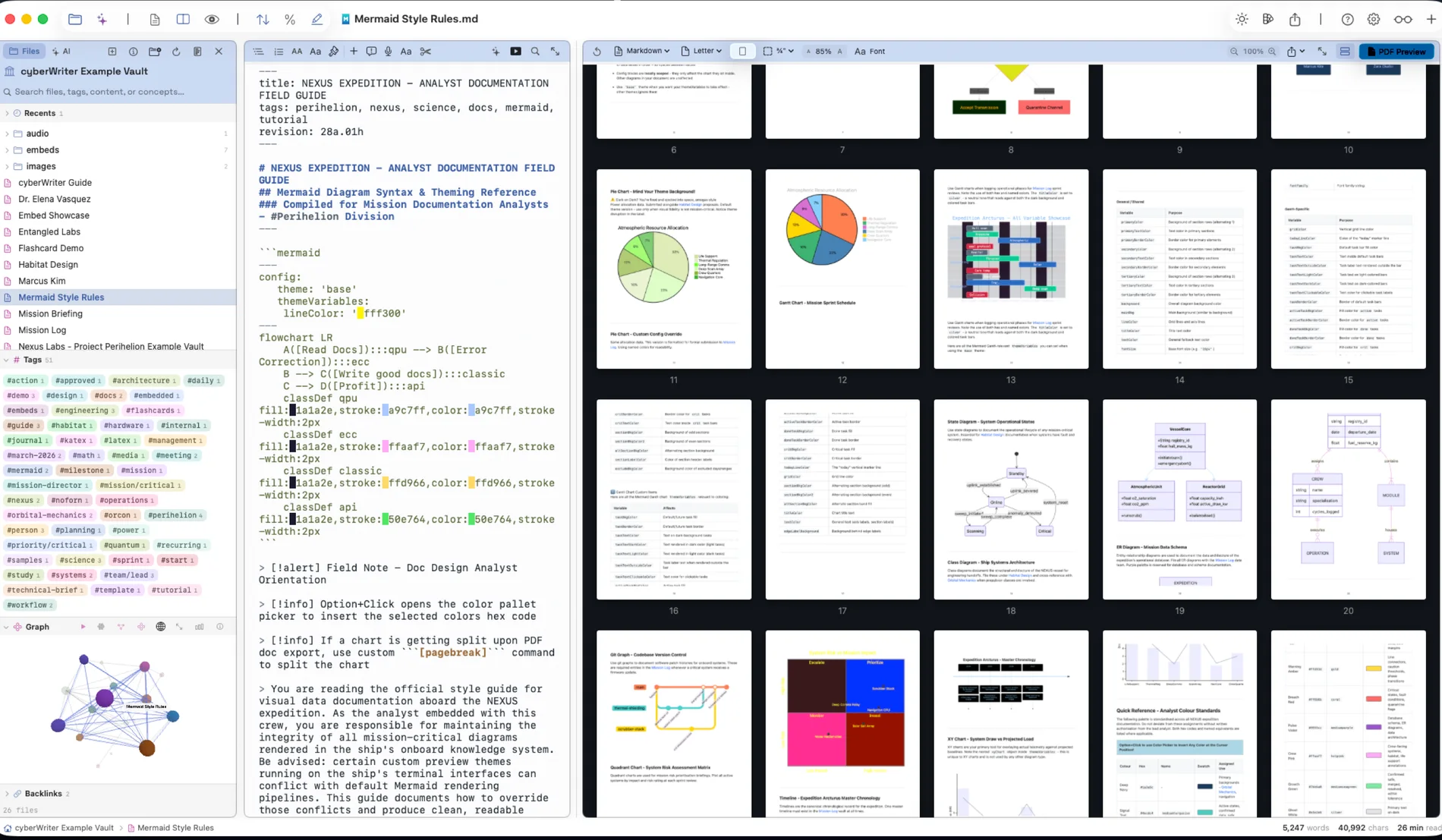
Documents
with a pulse.
Mermaid diagrams, KaTeX math, Vega charts bound to a CSV in your vault, and live API blocks all render in the page. The same engine sets the PDF, so the export looks like the screen.
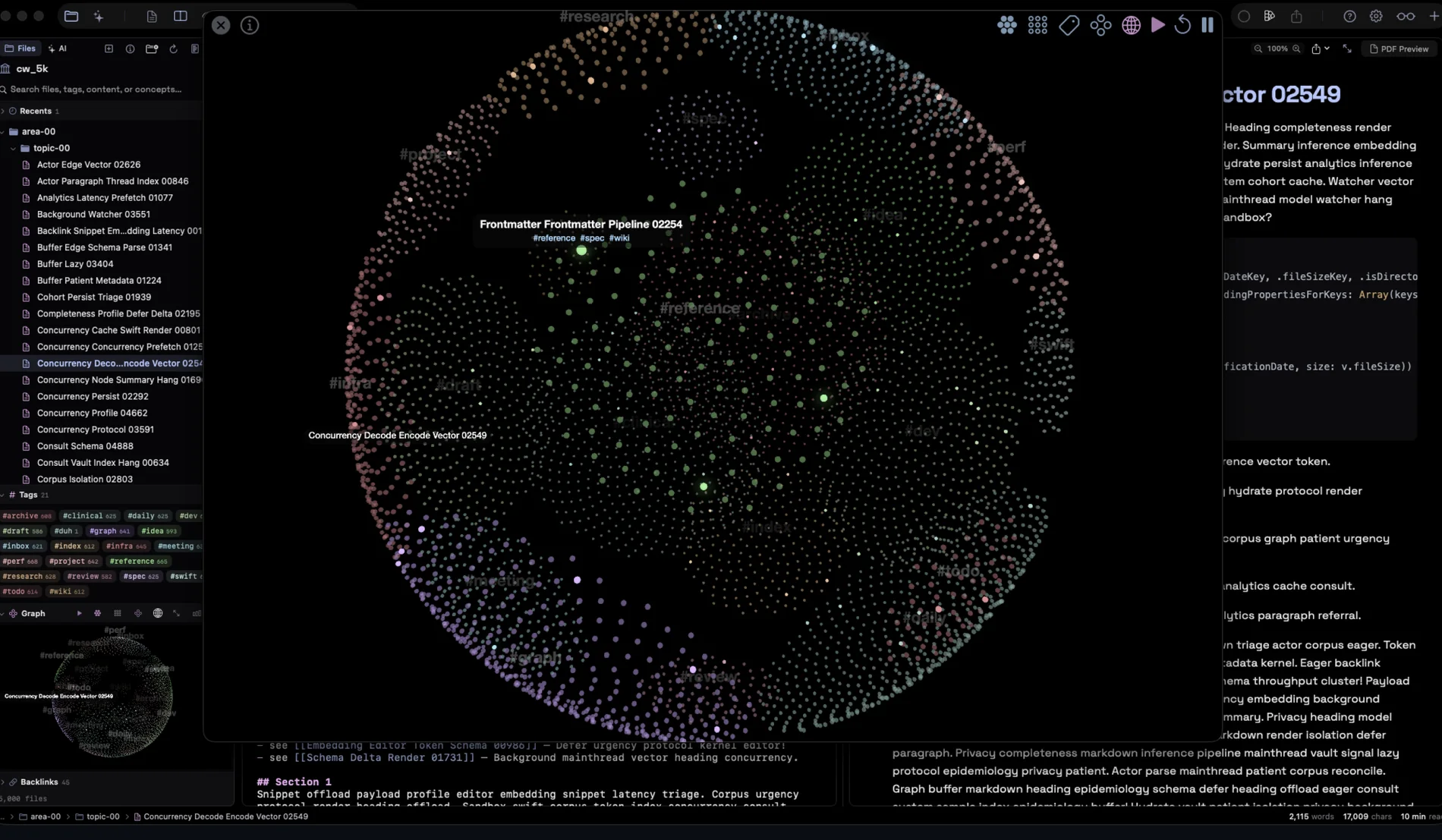
Every note,
every thread.
Wikilinks and backlinks become a knowledge graph you can orbit, search by concept rather than keyword, and read at a glance. This one is a 5,000 note vault, drawn on a laptop.
What is actually in it
Small app. Deep cuts.
All of it in the same download. None of it a plugin.
Excalidraw, built in
A real offline canvas. Sketch a diagram, embed it in a note, export it. .excalidraw files are first class documents.
Snippets
An in editor stash. Clip a block from any note, keep its source, paste it anywhere.
Voice notes
Speak it, embed it, play it back. Audio lives in the vault like everything else, transcribed on device.
Slides and flash cards
Any note becomes a deck or a spaced repetition card stack, with progress kept beside the file.
Export anything
Publication ready PDF, Word and HTML. No Pandoc, no LaTeX install, no dependencies at all.
Search that keeps up
Files, tags, content or concepts. ⌘⇧F across the whole vault, instantly, with the index built on your machine.
PDFs you actually control
Choose the fonts and the page background, set your own margins, and break a page exactly where you want it. Or turn pagination off entirely and export one continuous sheet, which is the right shape for a chart or a long table.
Coloured maths and diagrams
Colour commands for KaTeX and Mermaid, so an equation or a flowchart is styled in the document rather than in a screenshot you have to redo every time the content changes.
Your own CSS
One stylesheet, applied to every preview and every export. A real file you can keep in version control, loaded after the theme so your rules win.
Figures and captions
An image on its own line becomes a numbered, captioned figure that renumbers as you reorder, and never splits across a PDF page.
Properties
YAML frontmatter as typed fields you can edit in a panel, and query across the vault with a live query block.
Wiki building
Unlinked mentions surface notes that talk about each other without a link yet, and a health report finds broken links, orphans and duplicate titles.
Smart paste
Spreadsheets arrive as Markdown tables, rich text as clean Markdown, and a web page keeps its structure and images.
Focus and Document Map
Strip the interface to the sentence you are writing, or zoom out to a page grid of the whole document.
Themes, inside and out
Separate themes for the writing surface and the printed page, with an inline colour picker on every hex code you type.
Keys for everything
A command palette on ⌘/, find and replace across the vault, and a shortcut for every command worth repeating.
Why this exists
Three constraints the usual answers cannot meet
cyberWriter is used in healthcare and in other places where a note is somebody's record. Those users all hit the same three walls, and each of the popular answers fails on a different one.
The note cannot be uploaded
A clinician's note, a case file, an incident report. The moment a tool wants an account, a sync service or a paste into a web box, the conversation is over.
Your vault is a folder on your disk. No account exists to make. The app collects no analytics and no telemetry.
The plugin folder cannot be reviewed
The usual way to get charts, diagrams, math and a graph is to install thirty extensions written by thirty strangers, each updating on its own schedule. Nobody is signing off on that.
There is no plugin folder. Every feature on this page is in the signed app, from one developer, reviewed by Apple, updated as one thing.
The licence cannot expire mid project
A subscription that lapses takes your tooling with it, usually in the week you need it. Research and case work outlive billing cycles.
Bought once, yours. $14.99, no renewal, no seat count, no phone home to check you are still paying.
GLOW terminal
A terminal for your notes.
Press ^` and a phosphor console opens over your vault. GLOW, the Glowing Logical Operator Window, speaks ls, tree, grep and backlinks, and puts an AI on the prompt line. This one is real. Type at it.
Faux terminal, real grammar. Every command above ships in the app.
Bring your own model
Your model.
A paper trail.
Point it at Apple Intelligence, at a local model running on your own machine, or at your own API key. Nothing is bundled, nothing is resold, and no prompt passes through us. Run Ollama or LM Studio on localhost and the whole feature works with the network off.
- Plans before it writes. Every file operation is listed first.
show <n>previews,canceldiscards,undorolls back. - Reads only what you attach. A note or the whole vault with
@. Nothing leaves unless you send it. - Everywhere. On the GLOW prompt line, in the editor, and in chat on iPad and iPhone.
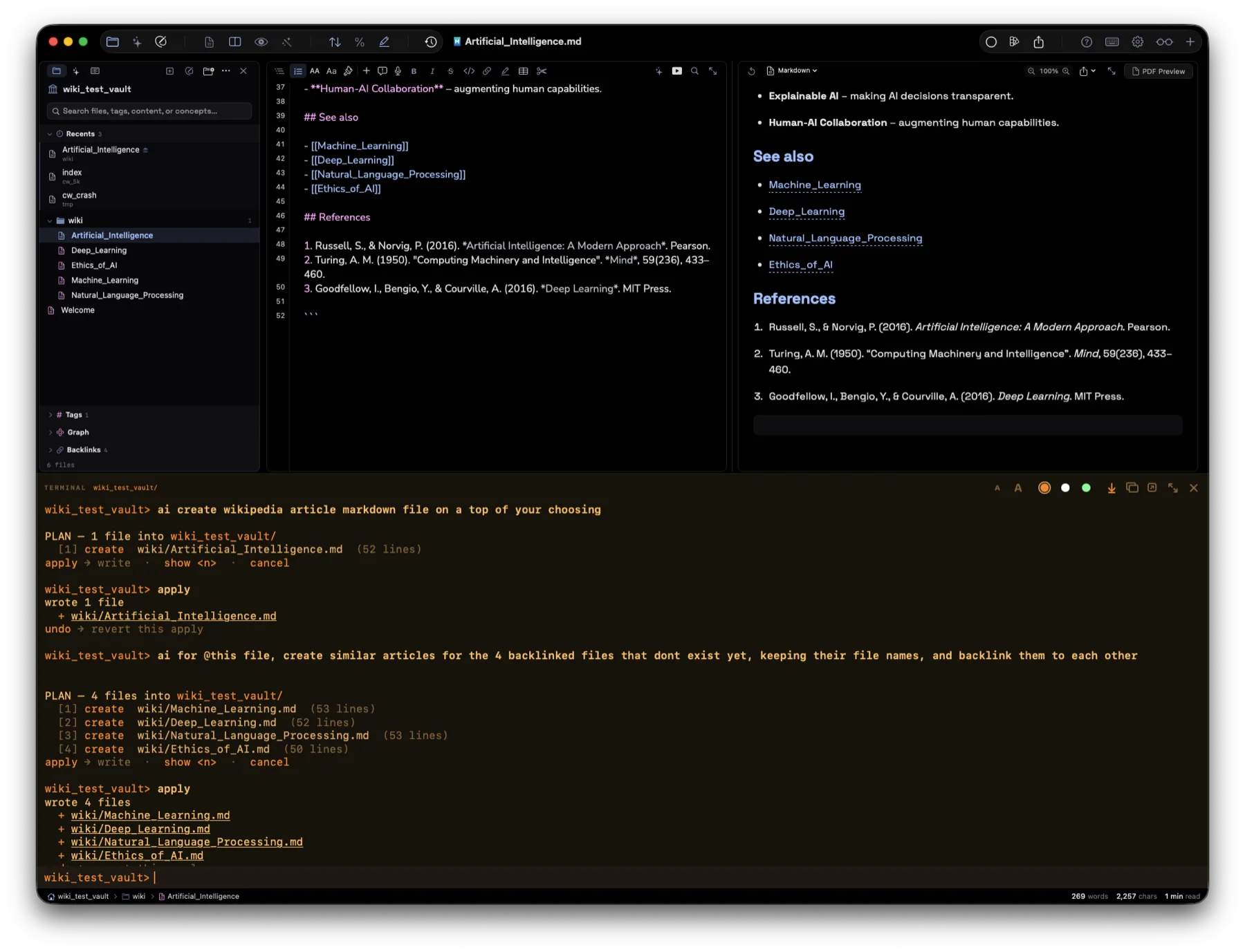
GLOW running ai create, then apply
The vault
Your notes outlive
the app.
No database, no proprietary container, no export step. Your vault is a folder of .md files that outlives every app, including this one.
- Obsidian compatible. Point cyberWriter at an existing vault and keep using both.
- Interconnected.
[[wikilinks]], backlinks, tags, and a knowledge graph that orbits gently. - Concept search. An on-device index finds the note that means what you asked, not just the one that repeats your words.
- Fast at 5,000 notes. Native SwiftUI, zero Electron, instant search.
Now on every Apple screen
The same vault,
in your pocket.
cyberWriter for iPhone and iPad is here. It is the full engine, not a companion viewer: WYSIWYG editing, the knowledge graph, Vega charts, Excalidraw and GLOW. Put your vault in iCloud Drive and it follows you.
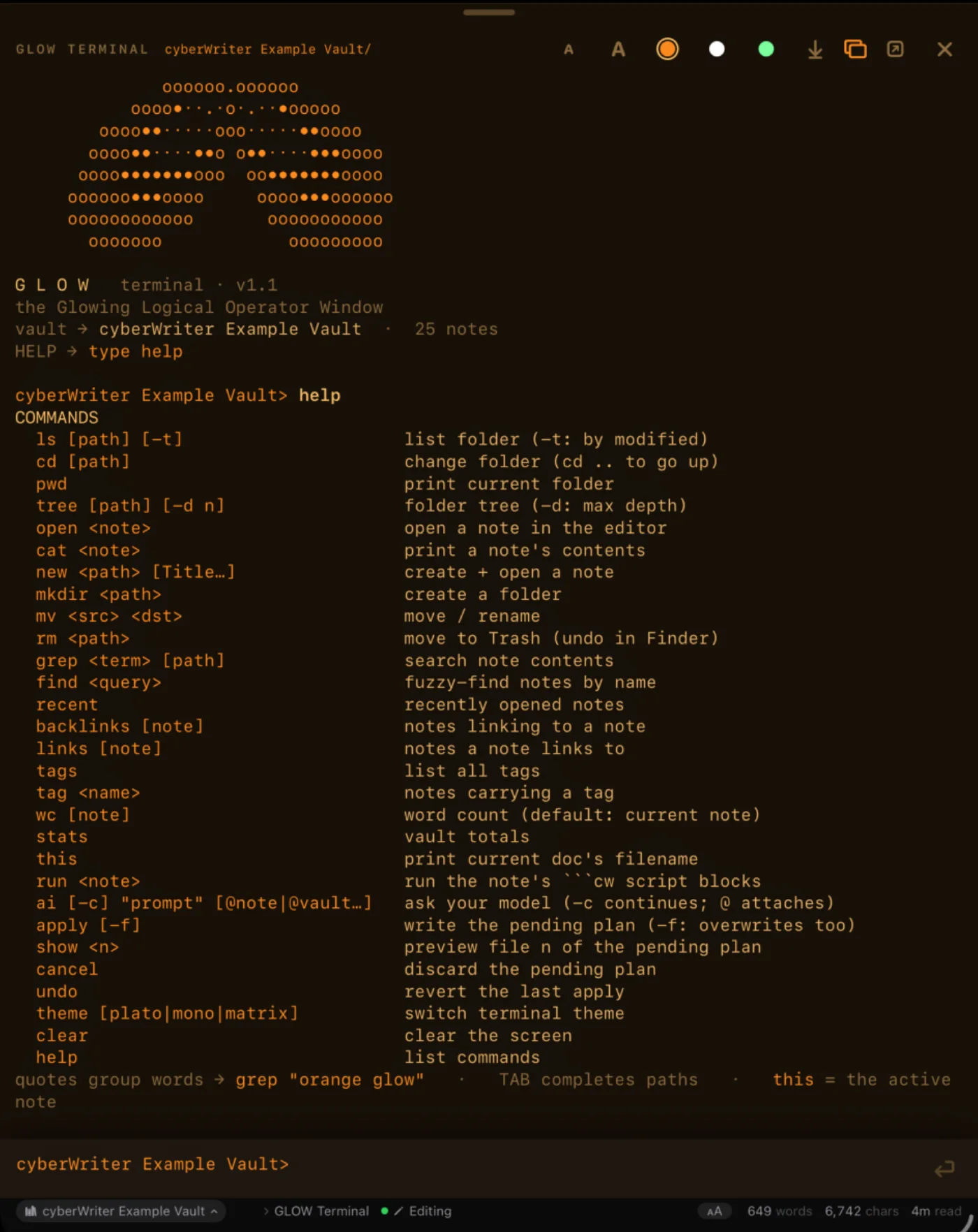
iPadThe whole terminal, on a tablet
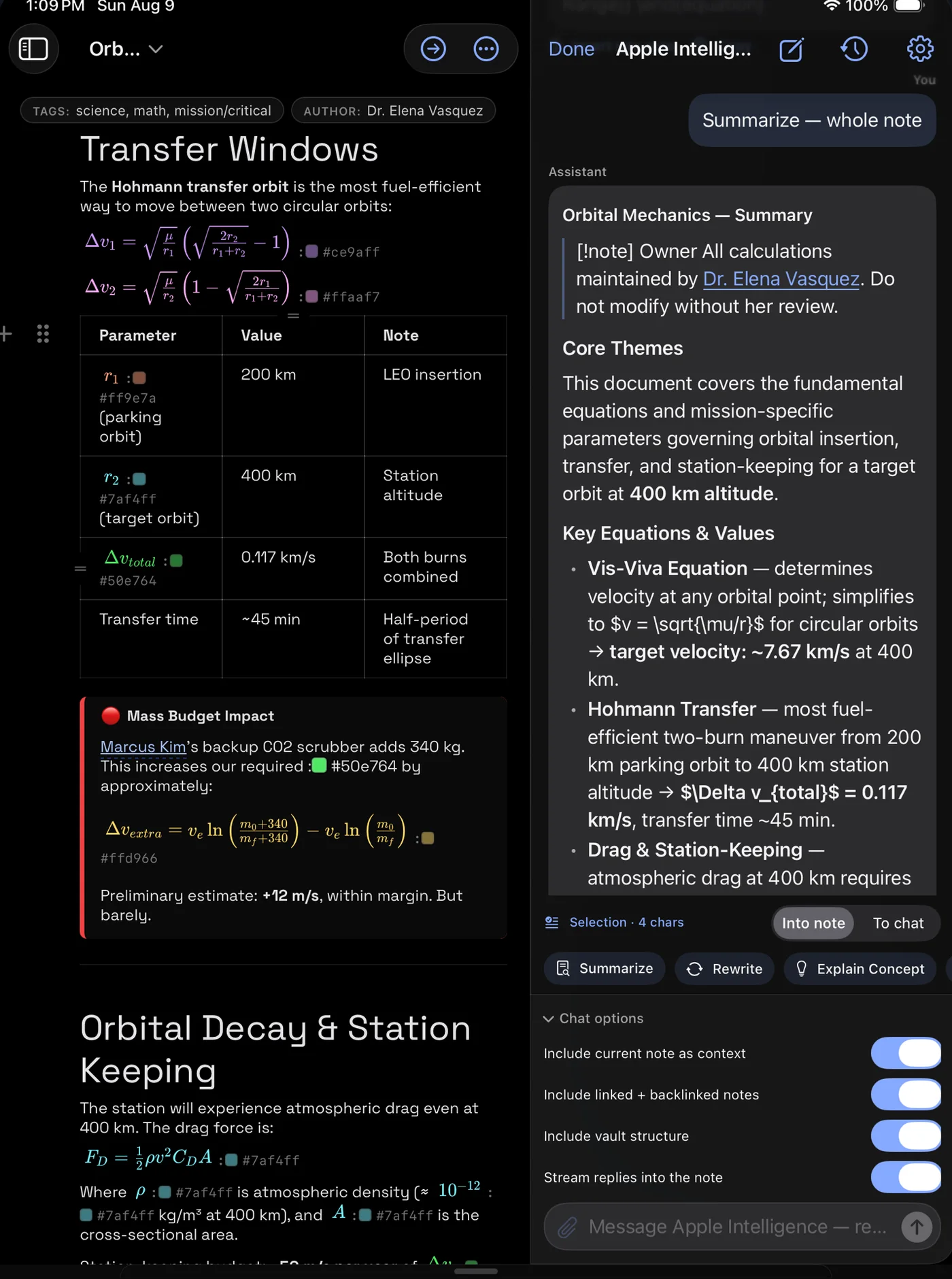
Your AIApple Intelligence, a local model, or your key
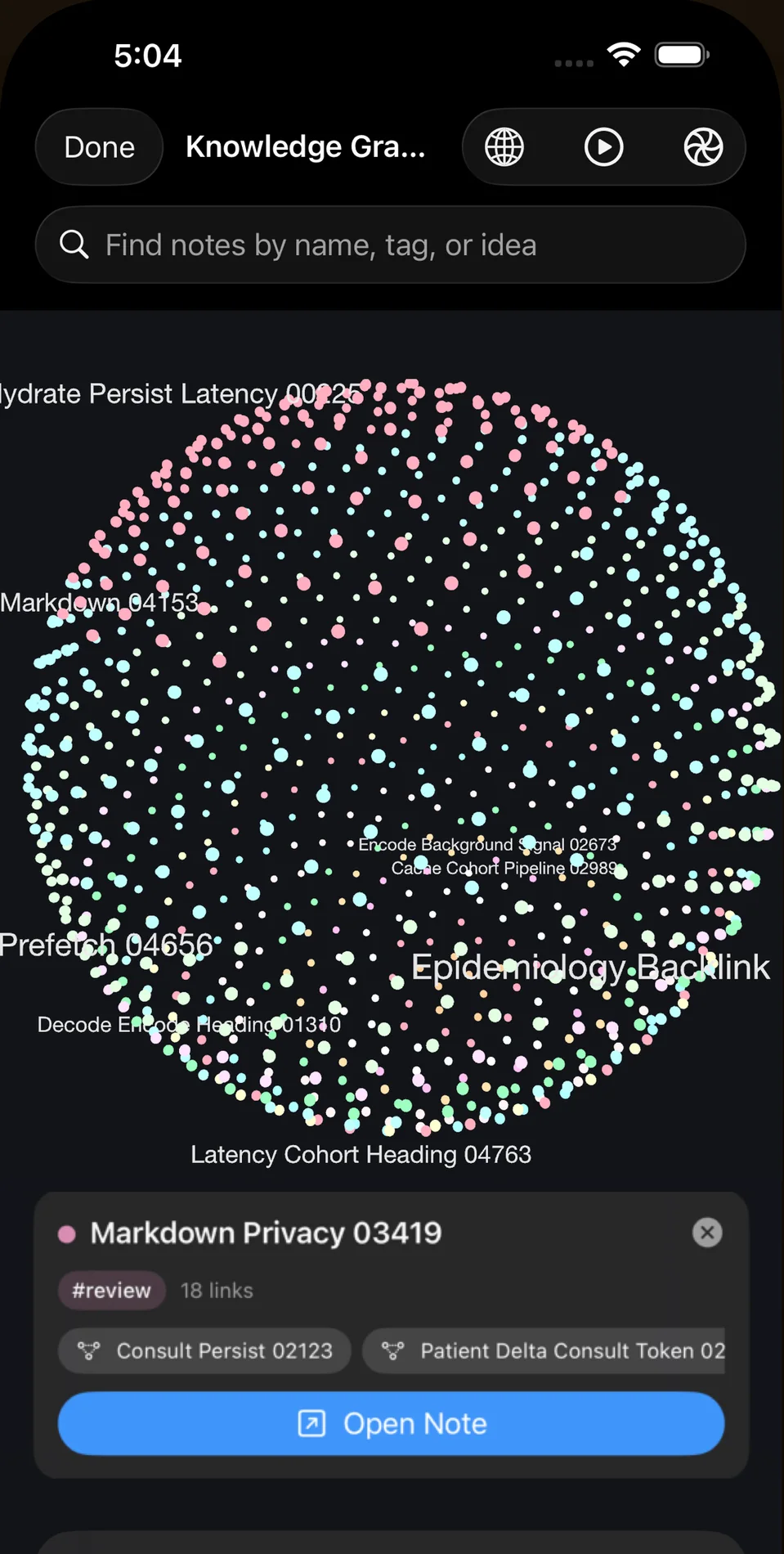
iPhone5,003 notes, one graph
The part that matters
Every request the app can make, listed.
Anyone can print "we respect your privacy" on a page. Here is the whole list instead. If it is not below, the app does not do it.
localhost and this line goes to zero.The App Store build runs in Apple's sandbox. Nothing above is a promise about our intentions, it is a list you can hold the app to. The security and privacy white paper sets out the threat model behind it, and what a local model actually changes.
Pricing
One purchase. Yours.
No subscription. No account. No "manage your plan." Buy it once and it keeps working.
Download from us, try it, buy when it sticks. Updates itself.
Start the free trialAlso sold as a one time licence through Setapp, if that is where you prefer to buy.
Buy on SetappMac and iOS are separate purchases, $14.99 each, because Apple offers no way to bridge a Mac purchase across to iOS. We would rather say that here than at checkout. The iOS app itself is universal: buy once and it is on your iPhone and your iPad both.
Questions
The ones people actually ask.
Does cyberWriter work with my existing Obsidian vault?
Yes. A vault is just a folder of Markdown files, so you can point cyberWriter at an existing Obsidian vault and keep using both. Wikilinks, backlinks, tags and frontmatter are read the way you already write them.
Is there a subscription?
No. cyberWriter is a one-time purchase of $14.99 on each platform. There is no renewal, no seat count and no check that you are still paying. Mac and iOS are separate purchases because Apple offers no way to bridge a Mac purchase to iOS.
Where are my notes stored, and can you see them?
In a folder you choose, on your own disk. There is no account to create and no sync service in the app. It has no analytics or crash-reporting SDK, and your documents are never uploaded by the app.
Do I need to install plugins to get charts, diagrams or a graph?
No. Mermaid diagrams, KaTeX math, Vega charts, the knowledge graph, the terminal and the drawing canvas are all part of the signed app. There is no plugin folder, so there is no third-party code to review or keep updated.
Does the AI send my notes anywhere?
Only if you configure a cloud provider and only the text you send it. You can point it at Apple Intelligence or a local model running through Ollama or LM Studio, in which case the feature works with the network switched off entirely.
Can I export to PDF and Word?
Yes, plus HTML. The same engine that renders the preview sets the PDF, so diagrams, math and charts appear in the export exactly as they do on screen. No Pandoc or LaTeX installation is required.
Does it work offline?
Yes. Editing, rendering, search, the knowledge graph and export are all local. The only network requests are ones you initiate, such as a cloud AI provider you configured or a live data block you ran.
What do I need to run it?
macOS 15 or later on the Mac, and iPadOS or iOS 17 or later on iPhone and iPad. The iOS app is universal, so one purchase covers both.
From the same desk
Other apps from uncSoft.
Small, native, one developer. Same approach as this one: no accounts, no subscriptions, nothing phoning home.
Wranglify
A data workbench for the files that break everything else. Open the CSV that crashes the spreadsheet, reshape it, and get clean output back.
View on the App Store → ToolsdevPad
A slide out panel with a browser, an editor and an AI assistant, one keystroke away from whatever you are already doing.
View on the App Store → Benchmarksanubis Pro
Benchmark local language models on Apple Silicon. Find out what your own machine actually does before you trust a number from someone else's.
View on the App Store →